Patches #85 answer board
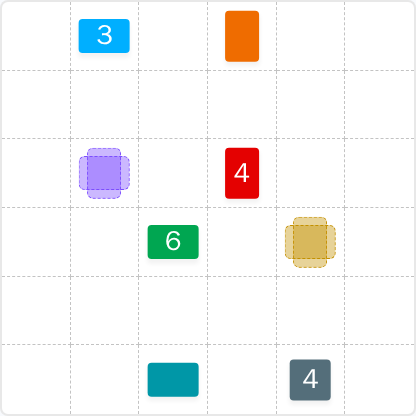

Wednesday, June 10, 2026 — the day this LinkedIn patch went live as that day's daily board.
Stuck on Patches #85? Below is the full colored board, the deductions that get you there, and the lessons you can carry to tomorrow's grid.
Wednesday, June 10, 2026
The answer is hidden until you ask for it. Work through the board, then hit Reveal the solution to compare your work — or pick another day.
One puzzle a day from LinkedIn isn't enough to call yourself good at this. Patches Unlimited hides the answer on every past board so you can replay them blind — and find out how much of your read on the grid actually held up.
Each step closes one rectangle. The order matters: every placement narrows what the next clue can be.
The most decisive starting point is the Grey 4 in the bottom-right corner. While a 4-cell shape can be a 1x4 or 4x1 rectangle, its potential to be a 2x2 square is a constraint. Placing it as a 2x2 square in that corner immediately locks down a predictable, stable block of the grid.
With the Grey 4 set, the Gold shape above it is now trapped. It's bounded by the top of the Grey 4, the top of the grid, and the right edge of the grid. This leaves a space that is exactly 4 cells tall and 2 cells wide. This forces the Gold shape to be a 4x2 rectangle, revealing its area as 8.
The combination of the Gold 8 and the Grey 4 creates a solid "wall" six cells high along the right side. This new boundary becomes the key to solving the middle of the puzzle.
The Red 4 is now pushed up against this wall. The only way for a 4-cell shape to fit in the column next to the Gold/Grey wall is as a vertical 4x1 strip. No other configuration is possible.
The placement of the Red 4 now defines the right-hand boundary for both the Green 6 and the Purple 6. The Green 6 must be a 2x3 or 3x2 rectangle. A 2x3 rectangle fits in the space available. This, in turn, defines the bottom edge for the Purple 6, which must also be a 2x3 rectangle to fill the remaining space.
With the main blocks in place, the rest is simple. The Teal shape at the bottom is left with a 1x3 space, making it a 3. Likewise, the Light Blue 3 at the top is forced into the remaining 1x3 slot. The final piece, the Orange shape, fills the last 2x1 gap, revealing its value to be 2.
When a clue for a square number (4, 9, 16) is in a corner, always test its square configuration first (e.g., 2x2 for 4). This move establishes a large, stable anchor that dramatically reduces ambiguity for neighboring shapes.
The Gold 8 and Red 4 were "forced" into their tall, narrow shapes by the pieces next to them. Always be on the lookout for how placing one patch creates a long, straight boundary that dictates the orientation (vertical or horizontal) of an adjacent patch.
This puzzle was solved from a point of high certainty (the Grey 4 as a square) and moved progressively into areas of ambiguity. Avoid guessing in the open middle. Instead, establish a beachhead on an edge or corner and expand from there. Consistent practice of this principle is key.
Patches #85 ran on Wednesday, June 10, 2026 as part of LinkedIn's daily mini-game lineup. The board is no longer playable on LinkedIn itself, but the original colored grid lives at the source linked below.
Patches #85 is a 6×6 board — 36 cells in total — to be carved into several non-overlapping rectangles.
Yes — we replay the puzzle on LinkedIn Games every morning, capture the start and solved boards, and only publish once the colored solution matches LinkedIn's official reveal. If the LinkedIn server changes the daily puzzle mid-day, we reflect the change here within minutes.