Patches #69 answer board

Monday, May 25, 2026 — the day this LinkedIn patch went live as that day's daily board.
Stuck on Patches #69? Below is the full colored board, the deductions that get you there, and the lessons you can carry to tomorrow's grid.
Monday, May 25, 2026
The answer is hidden until you ask for it. Work through the board, then hit Reveal the solution to compare your work — or pick another day.
One puzzle a day from LinkedIn isn't enough to call yourself good at this. Patches Unlimited hides the answer on every past board so you can replay them blind — and find out how much of your read on the grid actually held up.
Each step closes one rectangle. The order matters: every placement narrows what the next clue can be.
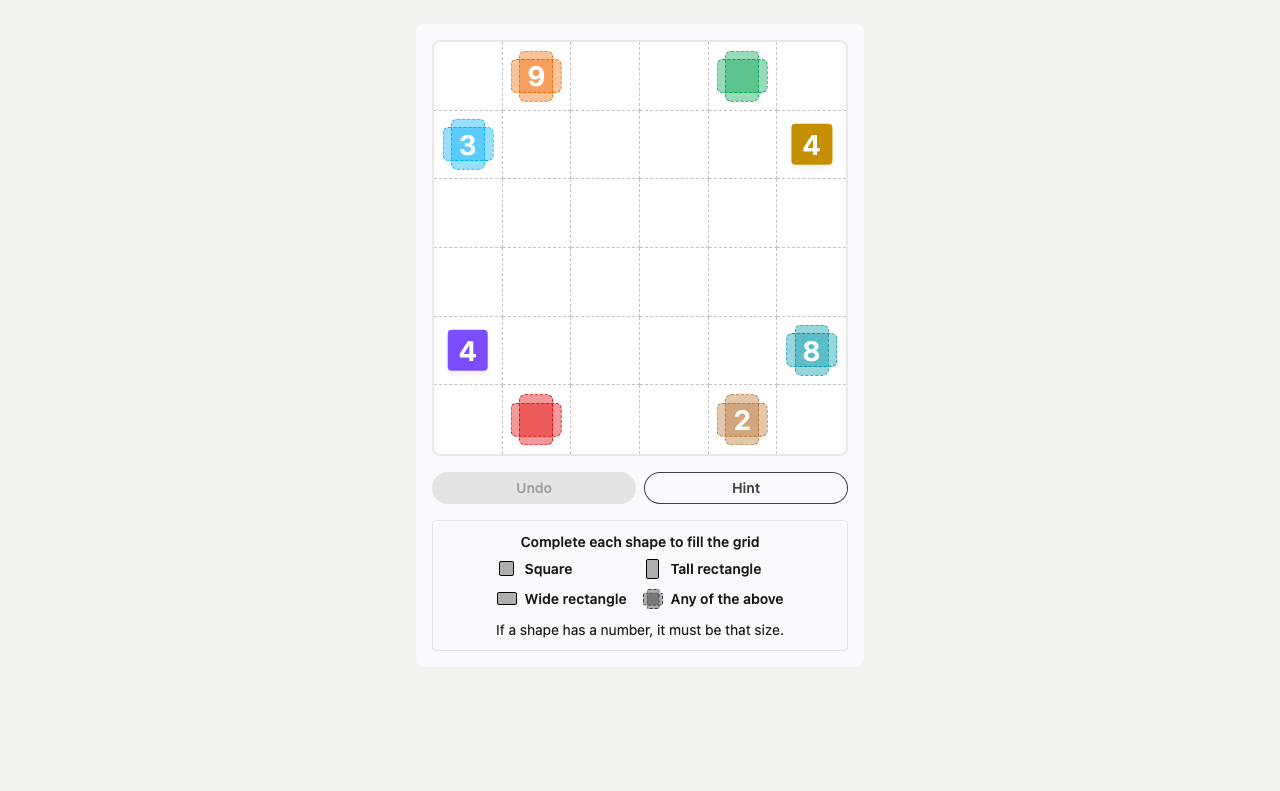
The Orange 9 is the perfect starting point. On a 6x6 grid, a rectangle with an area of 9 has only one possible dimension: 3x3. Any other configuration (1x9 or 9x1) is too large. The hint is located in the cell at column 2, row 1. To contain this hint, the 3x3 square must occupy columns 2-4 and rows 1-3. This single placement is the key that unlocks everything else.
With the Orange 9 placed, the Blue 3 (hint at C1, R2) is now pinned between the orange block and the left edge of the grid. The only way to form a 3-cell rectangle in this 1-cell-wide gap is a 1x3 vertical strip, filling C1, R1-3.
The top of the grid now reveals its structure. We have Blue, Orange, and two empty columns on the right (C5-6). The Green hint (for a shape of area 2) sits at C5, R1. A 2-area shape can only fit here as a 2x1 horizontal rectangle at C5-6, R1.
This leaves a perfect 2x2 hole at C5-6, R2-3. The Gold 4 hint is at C6, R3, which falls right inside this empty block. The Gold 4 must therefore be the 2x2 square that fills this space. The entire top half is now complete.
Moving to the bottom, the Purple 4 (hint at C1, R5) cannot be a 1x4 rectangle, as the space below the Blue 3 is only three cells tall. It is forced to expand sideways, becoming a 2x2 square at C1-2, R4-5.
This forces the Red 4 (hint at C2, R6) to be a 4x1 strip along the bottom at C1-4, R6. The remaining gaps are now defined: a 2x1 space for the Light Brown 2 at C5-6, R6, and a large 4x2 space for the Teal 8, which neatly fills the rest of the grid.
Patches #69 has 1 prime-area patch (area 3). A prime area can only fit a 1×N strip, so its orientation usually falls to a single edge constraint.
2 × 2 square rectangle occupies an area of 4 cells in a square shape (2×2). Square areas have no rotational ambiguity, so the only remaining question is where on the grid the square fits.
Patches #69 ran on Monday, May 25, 2026 as part of LinkedIn's daily mini-game lineup. The board is no longer playable on LinkedIn itself, but the original colored grid lives at the source linked below.
Patches #69 is a 6×6 board — 36 cells in total — to be carved into 8 non-overlapping rectangles.
8 patches need to be placed. Each rectangle wraps exactly one clue, and the numbers on the clues add up to every cell on the grid.
Any clue whose area is prime collapses to a 1×N strip. In this board that means 3 × 1 any rectangle (area 3). Place those first and the rest of the grid follows.
Yes — we replay the puzzle on LinkedIn Games every morning, capture the start and solved boards, and only publish once the colored solution matches LinkedIn's official reveal. If the LinkedIn server changes the daily puzzle mid-day, we reflect the change here within minutes.